
Welcome to The Coin Investor, where we make the complex world of crypto simple for you.
If you are new to Bitcoin or have been trading digital assets for a long time, you need the best tools.
For many years, Cryptowatch was that tool. It was a favorite trading platform for traders who wanted to see everything in one place.
But things change fast in the crypto market. Today, we will look at what Cryptowatch was, why it went away, and what you can use now in 2026. We believe in being smart and informed. This guide will give you the market knowledge you need to keep growing your wealth.
Let’s dive into the story of this famous terminal and find the best cryptowatch alternative for you.
What Was Cryptowatch and Why Was It Popular?
Cryptowatch was a very special tool created by Artur Sapek in 2014.
It was not just another website; it was a powerful interface that gathered cryptocurrency market data from many places.
Before this, you had to open many tabs to see prices.
Cryptowatch fixed that. It became the go-to place for market analysis because it was fast and easy to use.
Key Features of the Original Cryptowatch Terminal
The Cryptowatch terminal was famous for its “dark mode” look and simple design. It did not have fancy distractions.
It just showed you what you needed: the price movements, the order book, and the trade history. Traders loved it because it felt professional.
It gave an overview of the whole market at one glance. You could see market trends happening right in front of your eyes without any lag.
Real-Time Market Data and Multi-Exchange Charting
One of the best things was how it handled market data. You could watch Bitcoin (BTC) on Kraken, Ethereum on Coinbase Pro, and other coins on Binance or Bitfinex, all at the same time.
It pulled live data using a fast API. This means the numbers changed instantly on your screen.
You did not have to refresh the page.
This cryptocurrency charting tool helped people make quick decisions based on real market movements.
The “Desktop” Experience: Performance and Customization
Later, they launched Cryptowatch Desktop. This was an app you could install on your computer. It was even faster than the website.
You could make your own dashboards. If you wanted a chart on the left and a chat box on the right, you could do it.
It was built with code (often shared on GitHub) that made it very stable. It did not crash even when the market changes were crazy.
It was the perfect home for your crypto portfolio.
What Happened to Cryptowatch? (The 2023 Sunset)
In 2023, big news came out.
Kraken, the exchange that bought Cryptowatch years ago, decided to close it down. They called it a “sunset.” This made many users sad because they lost their favorite charting interface.
But Kraken had a plan. They wanted to put all those great features directly into their own app.
Integration Into Kraken Pro
Kraken took the best parts of the Cryptowatch terminal and moved them to Kraken Pro. They wanted one powerful place for everything.
Now, you do not need a separate Cryptowatch account. You can use your Kraken login. The advanced charting interface inside Kraken Pro now looks and feels very similar to the old tool.
It still uses high-quality market data to help you trade crypto assets.
Timeline of the Cryptowatch Shutdown
The shutdown happened in steps.
First, they stopped selling new subscriptions. Then, on September 30, 2023, the Cryptowatch website, mobile app, and Cryptowatch Desktop stopped working. The Cryptowatch API was also turned off.
People who used the api key for their Google Sheets or Python scripts had to switch to the Kraken API. It was the end of an era, but also a new beginning for digital assets trading on Kraken.
How to Access Cryptowatch Features on Kraken?
If you miss the old look, don’t worry. You can find it on Kraken Pro.
When you log in, you will see a button to change your view.
You can set up your screen to show advanced order types, OHLC (Open, High, Low, Close) bars, and depth charts.
It is built to help crypto traders feel at home. You can still track BTCUSD and other pairs just like before.
Top Cryptowatch Alternatives For 2026
Since Cryptowatch is gone, you might want a new tool. There are many great options in 2026.
Here are the best ones we recommend for smart investing.
TradingView: The Industry Standard

TradingView is the biggest name right now. It is a great cryptowatch alternative. It has amazing cryptowatch charts style tools.
You can use hundreds of technical indicators like RSI (Relative Strength Index) and moving averages.
It works on the web and has a mobile app for iOS and Android. It connects to almost every exchange, so you can see price movements for any coin. It is very colorful and easy for beginners and experts.
Coinigy: Best For Multi-Exchange Management

If you have exchange accounts on many sites like Bybit, Binance, and Kraken, Coinigy is great.
It lets you trade on all of them from one tab. You do not need to log in to five different websites. You can manage your whole crypto portfolio in one place. It is very secure and uses API connections to keep your trade orders safe. It is a strong tool for serious traders.
GoCharting: A Feature-Rich Charting Competitor

GoCharting is a powerful tool that offers deep market analysis. It has very advanced features like footprint charts and volume profiles.
These are tools that help you see where the big money is moving. It is a bit like the Cryptowatch used to be—focused on data and speed.
It is a great choice if you love technical analysis and want to dig deep into the blockchain data.
TabTrader: The Mobile-First Alternative

If you trade on your mobile phone, TabTrader is the best. It is an app that puts a terminal in your pocket.
You can add API keys from different exchanges and trade on the go. It sends you fast alerts when prices change.
It is simple, fast, and perfect for checking market trends while you are away from your computer. It makes crypto trading easy anywhere.
How to Recreate the Cryptowatch Layout on Kraken Pro?
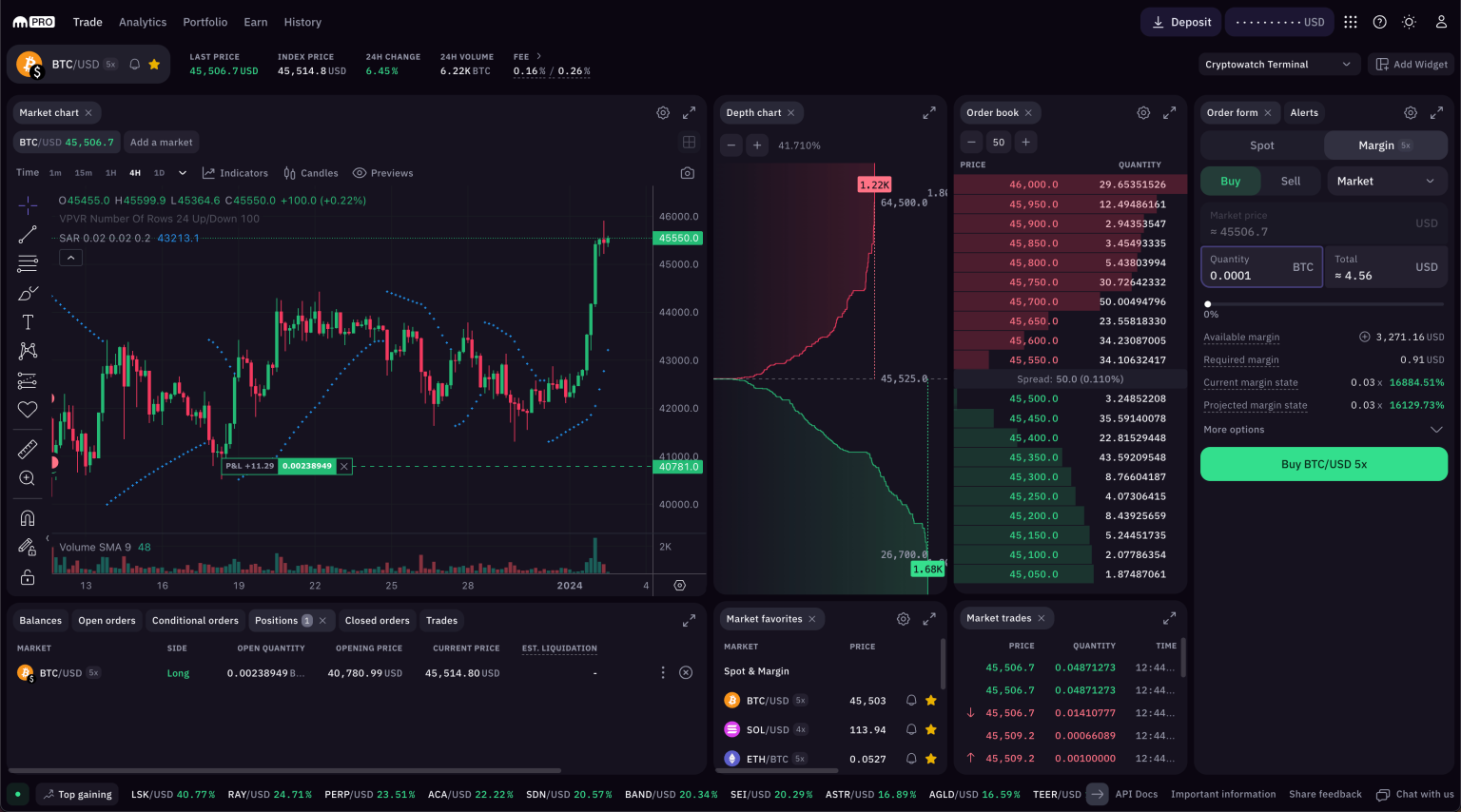
Do you want your screen to look exactly like the old Cryptowatch? You can do that on Kraken Pro. It is designed to be flexible.
Using the “Terminal” Preset
Kraken made it easy. In the settings, there is a default layout called “Terminal.”
If you click this, it will arrange all the boxes for you.
It puts the chart in the middle, the order book on the side, and the trade history at the bottom. It mimics the classic cryptowat.ch style.
This is the fastest way to get that familiar feeling back.
Customizing Widgets For A Similar Workflow
You can also move things around yourself.
You can drag and drop widgets. You can make the chart big or small. You can add a watchlist to see BTC, USD, and other crypto prices.
You can even set up alerts so you know when to buy or sell.
This customization lets you build a workspace that fits your style, just like Artur Sapek envisioned for the original tool.
FAQ’s:
Is Cryptowatch Still Available to Use?
No, the Cryptowatch website and desktop app are closed.
You cannot make a new Cryptowatch account. You should use Kraken Pro or a cryptowatch alternative like TradingView.
Can I Still Access My Old Cryptowatch Charts and Portfolio?
Unfortunately, no. The data from the old platform is gone. You need to set up your crypto portfolio again on a new platform.
If you had an API key connected, you should delete it and make a new one for your new tool.
What is the Best Free Alternative to Cryptowatch?
TradingView is the best free option. It gives you great charts and market data without paying. For trading on many exchanges, TabTrader is also a good free choice for your phone.
How Do I Get the Cryptowatch Look On Kraken?
Log in to Kraken Pro. Go to the layout settings and choose “Terminal.”
This will set up your screen to look like the old Cryptowatch terminal. You can then adjust the id settings and colors to your liking.
Why Did Kraken Shut Down Cryptowatch?
Kraken wanted to focus on one great product.
Instead of running two separate things, they put all the good Cryptowatch features into Kraken Pro. This helps them give better service and more innovation to their users.
Conclusion
The world of digital assets is always moving forward. Cryptowatch was a legend that helped many people understand crypto.
It taught us the importance of good data and clear charts. Even though it is gone, its spirit lives on in Kraken Pro and other modern tools.
At The Coin Investor, we want you to be ready for the future.
Whether you choose Kraken, TradingView, or another app, the most important thing is to stay informed. Use these tools to watch market movements, track your wallet, and make smart choices. The right interface can give you the power to succeed. Keep learning, keep watching the blockchain, and let’s build the future of finance together.
Disclaimer: This article is for informational purposes only and does not constitute financial advice. Always do your own research before investing.